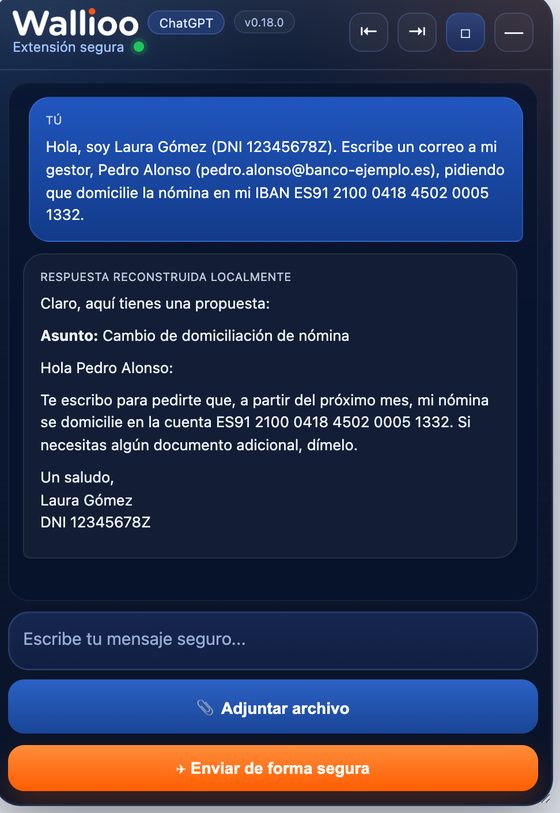
Ask any team how they write emails, summarise contracts or analyse a spreadsheet today and the answer is the same: with ChatGPT, Microsoft Copilot, Claude or Gemini. The productivity gain is real. So is the problem: a useful prompt very often carries personal data — a customer's name, an ID number, an IBAN, an employee's salary.
What GDPR actually expects
When an employee pastes personal data into a public AI tool, the company is disclosing that data to another organisation. GDPR does not forbid that, but it attaches duties to it:
- A lawful basis and a clear purpose for sending the data at all.
- Data minimisation: only the data that is necessary for the task.
- A processor agreement with the AI provider, and a check of international transfers if the data leaves the EU.
- Security and accountability: being able to show what was shared, by whom and why.
In practice, almost none of this happens when people use AI on their own initiative. Nobody minimises a prompt by hand, and nobody can show afterwards what was sent.
Why a policy document is not enough
Most companies start with an acceptable-use policy: "do not enter personal or confidential data into AI tools". It is necessary, but it does not change behaviour at the moment of use. People are busy, the data is already in the text they are working on, and the AI gives a better answer with context.
Banning AI does not work either. The use simply moves to personal phones and private accounts, where IT has no visibility at all.
What works: control at the moment of use
The effective approach is to apply the policy where the data actually leaves — in the browser, before the message is sent:
- Block what must never go out. Passwords, API keys, ID cards and health records are stopped, and the employee sees why.
- Hide personal data instead of blocking the work. Names, IDs, emails and bank details are replaced by codes such as
[PERSON_1]. The AI still understands the request; the employee reads the answer with the real values.
- Guide instead of punishing. Personal use can be allowed with a short note from the company.
- Record decisions, not conversations. Which AI was used, for what and what was protected — never the content of the messages.
This is data minimisation done automatically, for every message, with a record you can show to your DPO or an auditor.
How WALLIOO does it
WALLIOO Browser Guard is a Chrome and Edge extension that works with ChatGPT, Claude, Gemini and Microsoft Copilot. Every message is inspected in the browser before it is sent: secrets are blocked, personal data never reaches the AI, and the answer comes back with the real names. Every decision is recorded in WALLIOO Control, where IT and compliance see which AI is used and for what — without reading anyone's conversations.
Your teams keep the AI they like. You keep control of the data. See the use case →
This article is general information, not legal advice. Check your own obligations with your DPO or legal adviser.
Frequently asked questions
Is it legal to use ChatGPT at work under GDPR?
Yes, GDPR does not ban AI tools. What it requires is a lawful basis, data minimisation, an agreement with the provider and the ability to show what was shared. The risk comes from personal data being sent without any of that in place.
Is the business version of ChatGPT or Copilot enough?
Business plans usually improve the contract and data retention terms, which helps. They do not stop an employee from pasting a password, a customer list or health data — and they only cover that one tool.
Does WALLIOO read employees’ conversations?
No. WALLIOO records decisions and metadata — which AI, what kind of use, what was protected — never the content of messages or answers.